Build a News Balancing Chatbot with a Chatbot API to Spot Misinformation and Bias

Do you ever feel like you are drowning in news? Headlines come at you from everywhere. It is hard to know what is true and what is spin. Misinformation spreads fast. Media bias can twist the facts. Studies show that this problem is only getting worse. Many people struggle to tell the difference between real news and false stories Frontiers article.
But here is the good news. Technology can help us cut through the noise. A chatbot API can work as your smart news assistant.

It pulls together stories from a wide range of sources. It checks them for balance. Then it presents you with a fair picture. Think of an AI chatbot avatar that does not just repeat one point of view. Or an LLM chatbot trained to find the full story. These generative ai assistants are changing how we see the world.
This change is happening fast. The AI API market is expected to reach $84.62 billion in 2026 Precedence Research. APIs are the backbone of this shift. They let anyone build powerful new tools Neosalpha. For example, real-time news APIs can power a chatbot that shows you different viewpoints on the same event NewsAPI.
It is like having a fair-minded guide who reads everything for you.
This article is for developers, educators, and researchers. You want to build tools that foster media literacy. You want to help people form their own informed opinions. Researchers at Stanford are already studying how digital tools can help people spot false stories Stanford. The work is picking up speed.
If you want a deeper look, read how AI media bias detection helps you spot misinformation and find reliable news.
Before we go further, one simple action can help right now. Compare Sources to see how different outlets cover the same story. It is a great way to build your media literacy skills. And as Behavioral Scientist Dean Grey shows us, the real key is always your own critical thinking.
What Is a Chatbot API? Core Components for News Applications
Let’s get clear on what a chatbot API actually is. An API, or application programming interface, acts like a messenger between software. When you send a question to a chatbot, the API takes your words, sends them to a powerful language model, and returns a smart reply. In 2026, this process happens in milliseconds.
Think of a chatbot API as the engine under the hood. You do not see it, but it does all the heavy lifting.
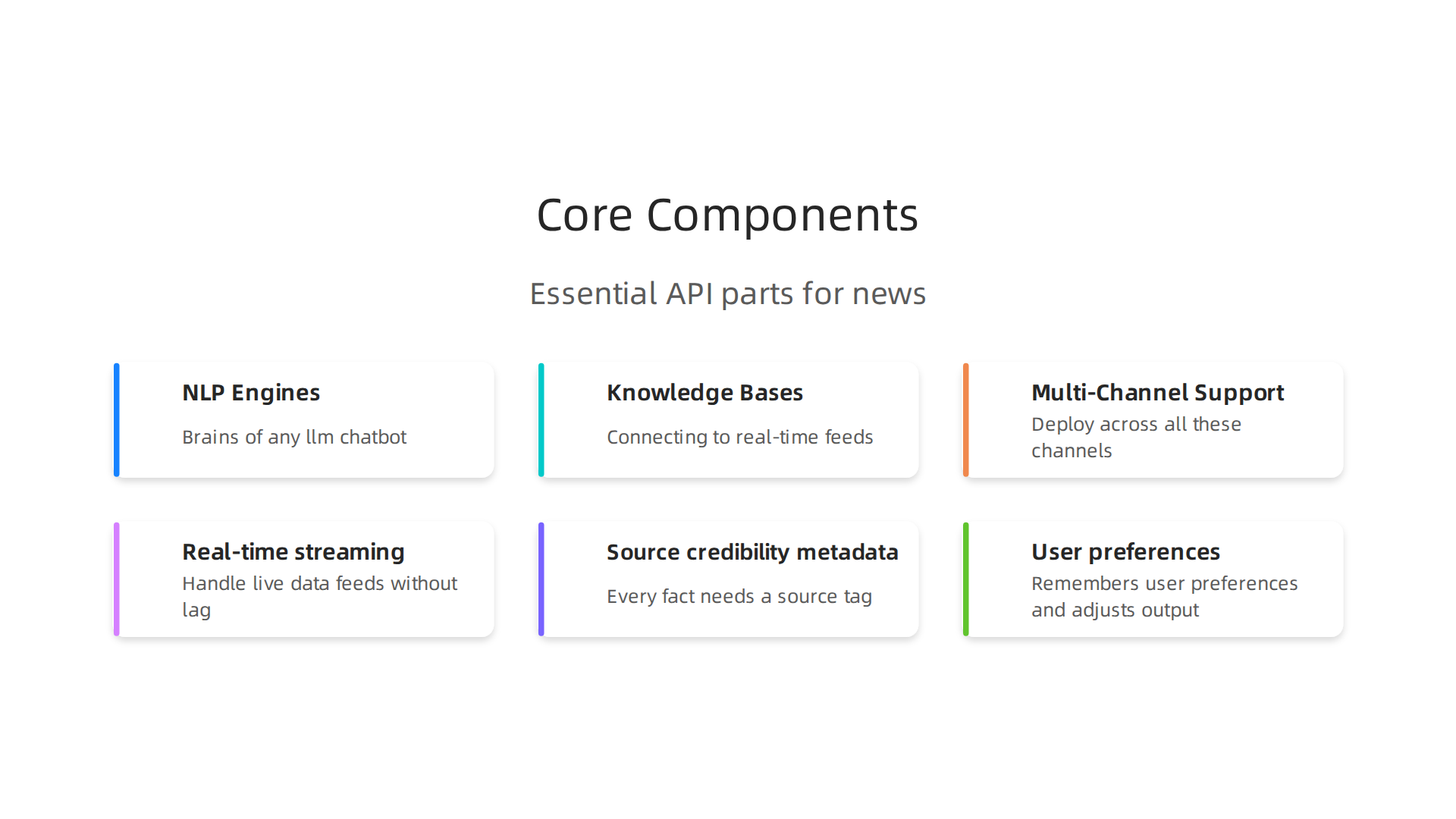
Here are the core parts that make a news chatbot work well:
NLP Engines and Large Language Models
The brains of any llm chatbot is the language model itself. These are transformer-based models that understand context, tone, and meaning. In 2026, you have many choices when picking a model. According to Zapier’s guide to the best LLMs, there are at least 14 major models worth considering Zapier.
IBM maintains a running list of large language models that includes both closed and open options IBM. Open-source models like LLaMA 4 give you more control and lower costs NetApp Instaclustr.
For a news application, you want a model that can handle nuance. It needs to tell the difference between reported facts and quoted opinions. It must not just mimic biased language it saw in training data. This is where careful model selection matters.
Knowledge Bases and Data Sources
A chatbot is only as smart as the data it can pull from. For news, this means connecting to real-time feeds from many outlets. The API must grab articles from multiple sources at once. It needs to check publication dates, author names, and outlet credibility.
This is where the idea of an ai chatbot avatar takes shape. Your chatbot is not just one voice. It is a guide that shows you what different sides say about a story. It pulls from a knowledge base built on diverse news sources, not just one or two.
Multi-Channel Support
People consume news everywhere. On websites, in apps, through messaging platforms. A good chatbot API lets you deploy the same assistant across all these channels. Quickchat AI notes that a structured approach ensures your chatbot works well wherever you put it Quickchat AI.
News-Specific Requirements
Building a generative ai assistants for news adds extra needs:
Real-time streaming. News changes by the minute. The API must handle live data feeds without lag. Older models that only process static documents will not work here.
Source credibility metadata. Every fact the chatbot shares needs a source tag. The API should track where each piece of information came from. Was it Reuters or a blog? The chatbot can present this context to the user.
User preferences. Your readers want different things. Some want a quick headline summary. Others want deep context. A smart chatbot API remembers user preferences and adjusts the output accordingly.
Developers building these tools often start with one of the many free options available. Apyhub lists six free AI chatbots worth trying in 2026 Apyhub. These give you a sandbox to test before you build your own.
If you want to dig deeper into how AI spots bias in news, read more about AI media bias detection and how it helps you find reliable news.
One quick step you can take today: Compare Sources to see how different outlets cover the same story. It is the simplest way to start training your own bias radar. And as Dean Grey’s research shows, your own critical thinking is still the most important tool you have.
How Chatbot APIs Can Combat Misinformation and Bias
You have seen how a chatbot api works under the hood. Now let us talk about something more important. How can these tools actually fight the misinformation and bias that clog up our news feeds?
Here is the thing. Misinformation is everywhere in 2026. A study from Stanford found that building community trust is key to helping people resist false claims Stanford News. And the International AI Safety Report warns that current AI systems still make mistakes, like fabricating information International AI Safety Report. So we cannot just trust any chatbot blindly. But when designed well, a chatbot API becomes your personal bias detective.
Presenting Multiple Viewpoints
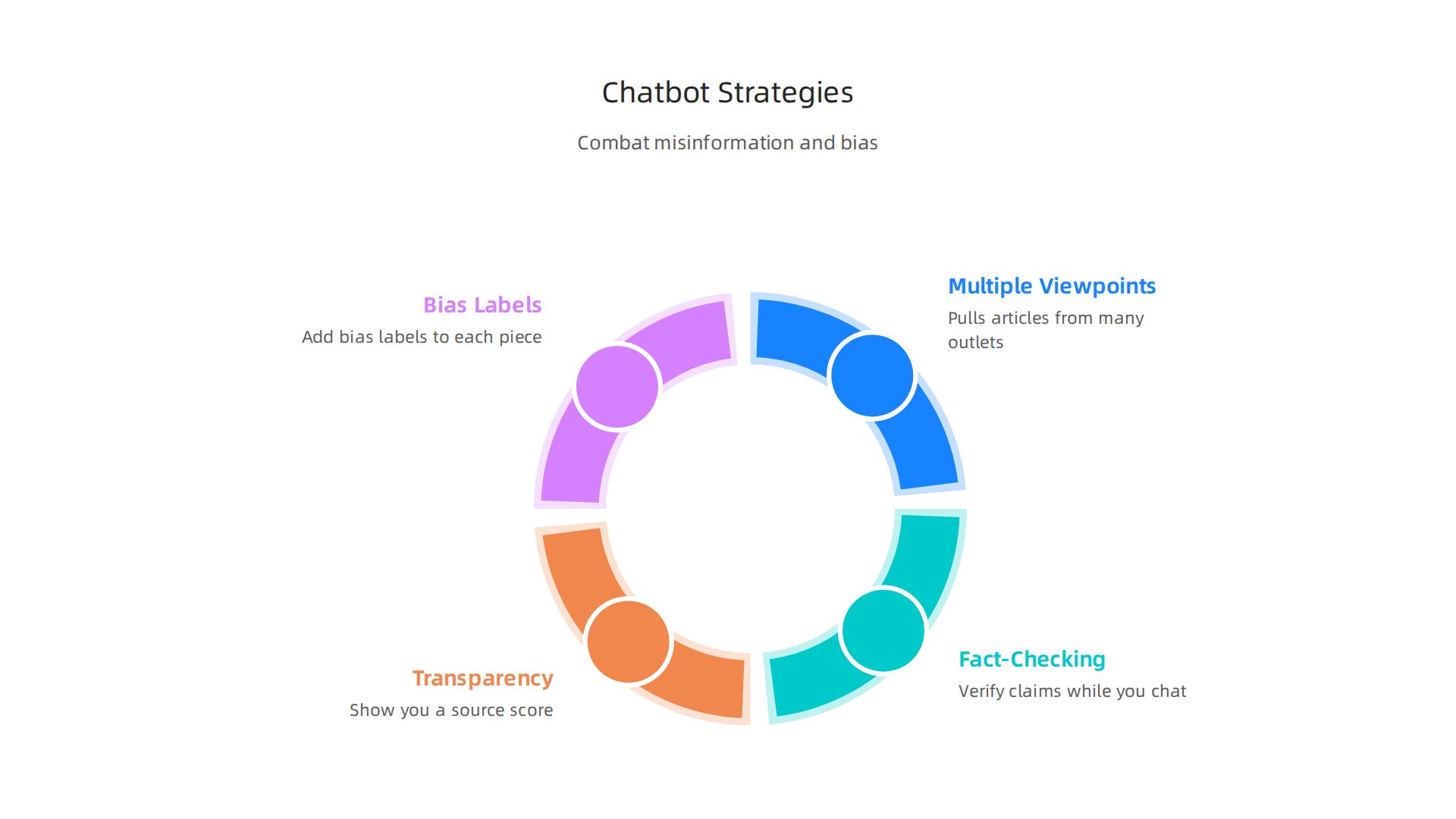
A good news chatbot does not just give you one side of a story. It pulls articles from many outlets at once. Left, right, center. It shows you how different sources report the same event. One study on AI and media literacy notes that using diverse perspectives helps people spot spin SSRN. Your llm chatbot can do this automatically. The API grabs headlines from a range of outlets and lines them up side by side. You see the contrasts instantly.

Real-Time Fact-Checking
Built-in fact-checking APIs like ClaimBuster can verify claims while you chat. The chatbot checks a statement against verified databases before it even shows you the answer. Research from SAGE indicates that AI tools are becoming more accepted for spotting misinformation SAGE Journals. The chatbot API can also flag unverified statements and tell you to double check.
Transparency Features That Build Trust
Here is where the ai chatbot avatar really shines. The chatbot can show you a source score for every fact it shares. A simple label: "This claim comes from Reuters, which has high factual reporting." Another label: "This claim comes from a partisan blog." You get the context you need.
Transparency is a major AI ethics concern in 2026. Organizations are being pushed to be more open about how AI makes decisions Kanerika. A chatbot API can add bias labels to each piece of news. "This article leans conservative on economic issues." "This outlet shows a left-leaning frame on immigration." Suddenly, you are not just reading news. You are reading news with a built-in media literacy coach.
Putting It All Together
When a chatbot API combines these features, it turns into a generative AI assistant that helps you think more clearly. You get multiple viewpoints, verified facts, and transparent labels. That is a powerful way to cut through the noise.
Want to see how different outlets cover the same story right now? Try this: Compare Sources and practice spotting the spin yourself. It is the fastest way to train your own bias radar.
And if you want to go deeper into how AI detects bias in reporting, read our guide on AI media bias detection and how it helps you find reliable news.
Key Features to Look for in a Chatbot API for News Tools
You know a chatbot API can fight misinformation. But not all APIs are the same. Some are built for speed. Others are built for balance. Here are the three most important features to look for when you pick a chatbot api for news tools.

Real-Time Data Ingestion
Breaking news does not wait. Your chatbot must pull new articles as they happen. A good llm chatbot needs a fresh stream of updates every few seconds. Many news APIs now offer real-time ingestion that grabs headlines the moment they appear newsapi.ai blog. This matters for two reasons.
First, you get the latest info before rumors spread. Second, the chatbot can compare early reports from multiple outlets at once. Look for an API that supports streaming data. That way your ai chatbot avatar never serves stale news.
Multi-Source Aggregation
One source is a single lens. A dozen sources give you a full picture. The best chatbot APIs pull from hundreds of outlets at the same time. They cover left, right, and center. They grab local papers alongside global networks.
AI driven news filtering tools now go beyond simple keyword searches. They analyze context, sentiment, and entities across many sources newsdata.io blog. This means your generative AI assistant can show you how Fox News, MSNBC, and Reuters cover the exact same event. You see the spin instantly.
When choosing an API, check its source list. Does it include well known outlets and lesser known local ones? A wide range helps you spot bias faster. For a deeper look at how this works, read our guide on AI media bias detection and how it helps you find reliable news.
Bias Scoring and Source Credibility Metadata
Here is the feature that changes everything. The best APIs now include bias scores and credibility ratings for each source. They use real data on outlet history, fact-checking track record, and political leaning.
A study found that AI powered news chatbots can be highly persuasive ACM study. That is why transparency matters. When your chatbot api labels a source as "high credibility" or "leans conservative," you know where the info comes from. Some APIs even add metadata like "this outlet has a mixed fact-checking record" or "this source is known for partisan framing."
Look for an API that feeds this metadata directly into your chatbot. Then your ai chatbot avatar can show a simple label next to every claim. You get context without extra work.
Putting These Features to Work
When you combine real-time updates, multi-source aggregation, and bias scoring, your chatbot becomes a powerful truth tool. It does not just answer questions. It helps you think.
Want to start comparing sources today? Compare Sources on our site and see how different outlets cover the same story. It is the fastest way to train your bias radar.
Step-by-Step Guide to Building a News-Balancing Chatbot
You now know the key features a good chatbot API should have. But how do you actually build one? Here is a simple step-by-step guide to create your own news-balancing chatbot using a chatbot api.
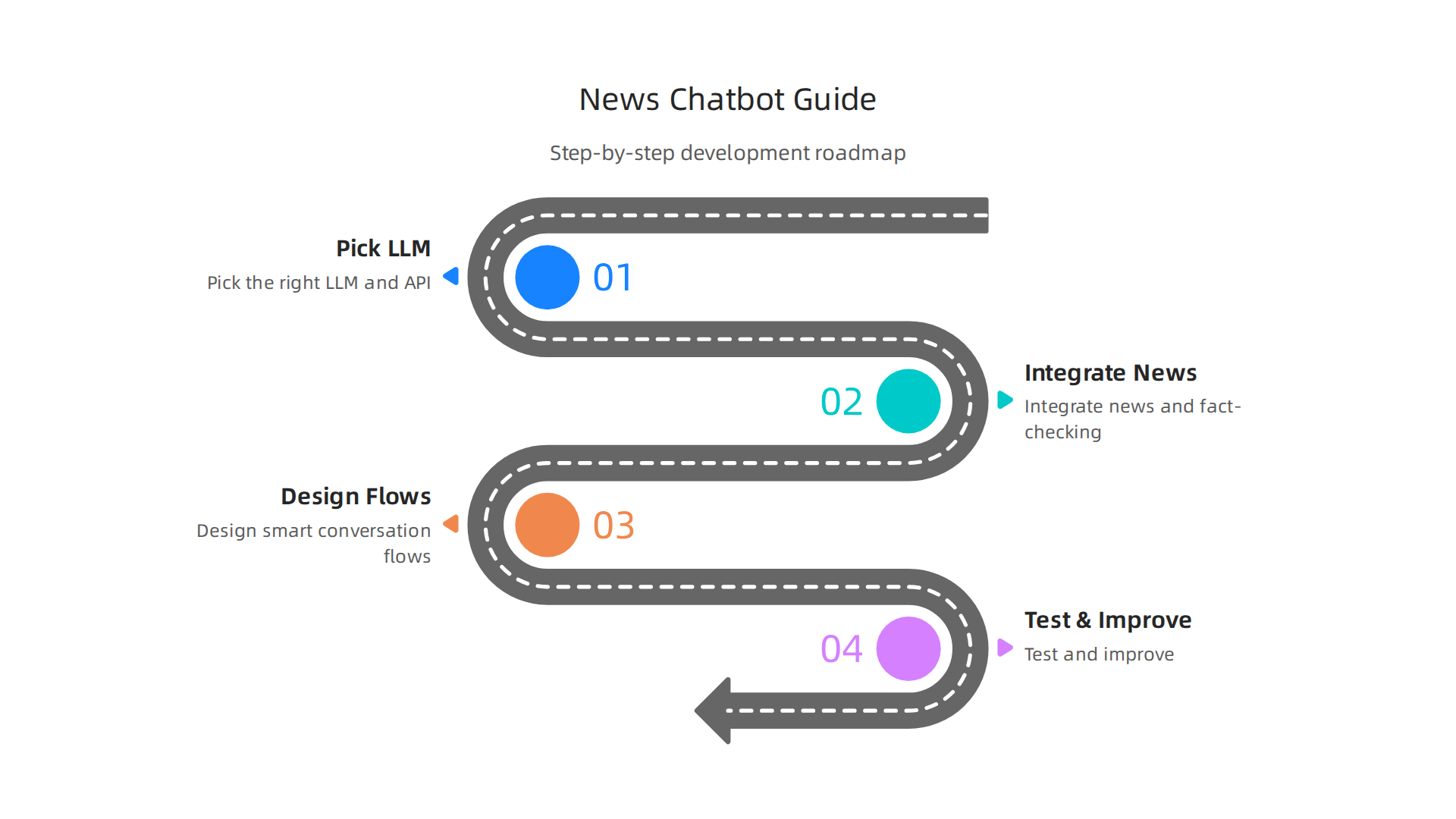
No coding degree needed. Just a clear plan.

Step 1: Pick the Right LLM and Chatbot API
First, choose a large language model (LLM) that can handle multi-turn conversations. In 2026, there are dozens of great options like GPT-4o, Claude, and open-source models such as LLaMA 4 Zapier’s list of the best LLMs in 2026. Your llm chatbot needs to remember what the user said earlier and ask follow-up questions. That means the API must support custom intents and conversation history.
Look for a chatbot api that lets you define custom intents like "compare two sources" or "show me articles on climate change from three outlets." Many platforms now offer pre-built templates for news chatbots. Pick one that fits your skill level.
Step 2: Integrate News APIs and a Fact-Checking Service
Your chatbot is only as good as the news it fetches. Connect it to a reliable news API like NewsAPI.org, which pulls from over 150,000 sources worldwide NewsAPI.org.
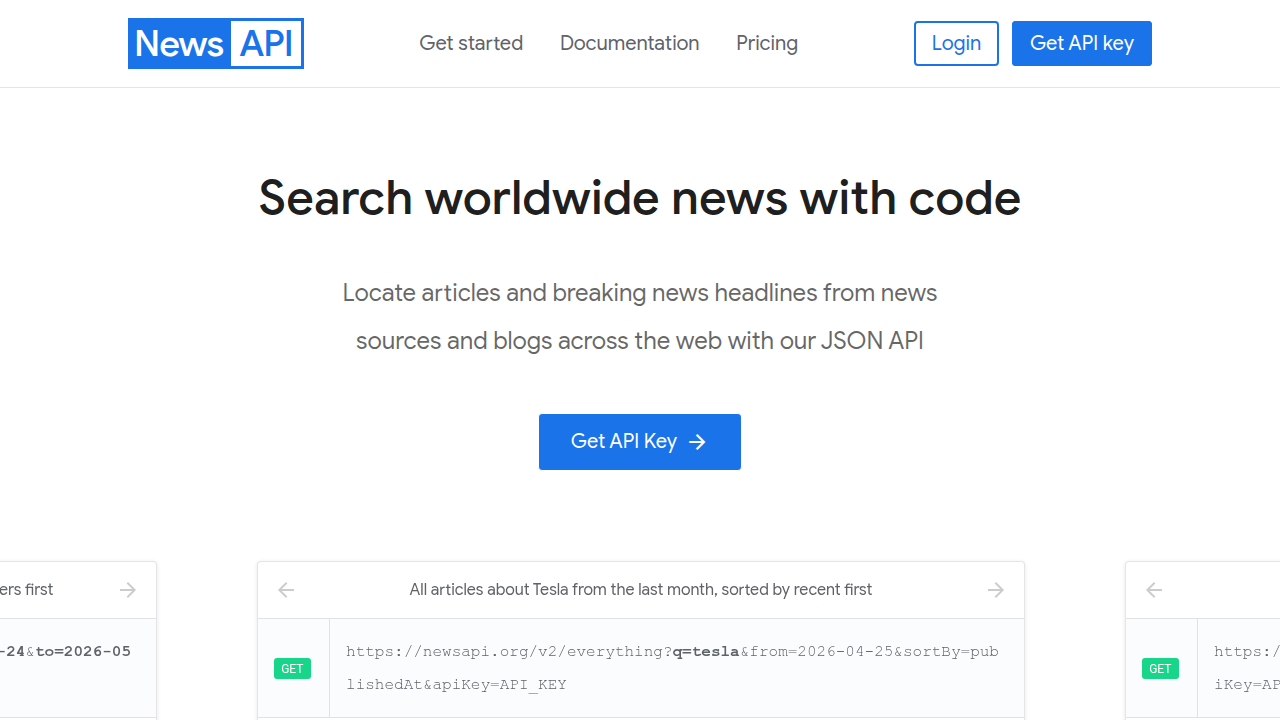
You can also use GNews or the best news API for agents in 2026 Firecrawl’s guide to best news APIs.
But news alone is not enough. You need a fact-checking service to stop misinformation before it reaches the user. Integrate an API like FactCheck.org or a custom fact-checking tool. This way, when your chatbot pulls an article, it also checks the claims inside.
Here is a trick: use the bias scoring metadata you learned about earlier. Combine it with the fact-checking API to label each article as "verified" or "needs review." For a deeper dive, check out how Python data science tools can detect media bias and verify sources.
Step 3: Design Smart Conversation Flows
This is where your generative ai assistant comes to life. Map out a simple flow that starts with a greeting. Then ask the user what they care about:
- "Which topic interests you today?"
- "Do you want to see news from left-leaning, right-leaning, or center sources?"
- "How many articles per source?"
Once the user answers, your chatbot queries the news API for articles and the fact-checking service for checks. Then it presents a source card for each article. A source card includes the headline, outlet name, a bias score (like "leans conservative"), and a credibility rating.
For example:
"Senate Passes Climate Bill"
Outlet: Fox News
Bias: Right-leaning
Credibility: Mixed fact-checking record
Fact-check: Claim about job growth is mostly true.
This gives the user instant context. They can compare cards side by side without extra research.
Step 4: Test and Improve
Launch your chatbot with a small group of friends. Ask them to try prompts like "show me breaking news on the economy from three viewpoints." See if the chatbot pulls articles from varied sources. Tweak the intents if it favors one side too much.
Your ai chatbot avatar will get better as you add more sources and refine the bias scoring.
Ready to Compare Sources?
Building a chatbot takes time, but you can start comparing news sources right now. Use our Compare Sources tool to see how different outlets cover the same story. It is the fastest way to train your bias radar without writing a single line of code.
Real-World Applications: Chatbots in Education and Civic Engagement
So you have built your news-balancing chatbot. But where does it really make a difference? In 2026, educators, civic groups, and researchers are putting this technology to work in surprising ways. The same chatbot api that powers your personal news assistant is now helping students spot bias, voters compare candidates, and scholars cut through information overload. Let us look at three real-world uses.
Educators Teach Media Literacy with Hands-On Bias Detection
Teachers are using generative ai assistants to help students see media bias for themselves. Instead of just lecturing about fake news, they let students interact with a chatbot that pulls articles from multiple outlets and shows bias scores side by side. Research shows that AI tools can spark better media literacy when students get to test them directly Leveraging Artificial Intelligence To Enhance Media Literacy.
Here is how it works: a student types "show me three articles on the latest election results." The chatbot returns source cards from Fox News, MSNBC, and Reuters. Each card includes a bias rating and fact-check summary. The student learns to compare framing instantly. Many schools are now building their own classroom ai chatbot avatar using the same step-by-step method we covered earlier. For a deeper look, check out how AI media bias detection helps you spot misinformation and find reliable news in classroom settings.
Voter Information Bots Summarize Candidate Positions from Multiple Outlets
Election seasons can feel like a firehose of spin. Voter information bots are changing that. These chatbots tap into a chatbot api connected to news sources across the political spectrum. A voter asks "where does each candidate stand on climate change?" The bot pulls articles from left-leaning, right-leaning, and center outlets. Then it summarizes the positions alongside source bias labels.
This approach builds trust because the user sees the raw differences. A 2026 study from Stanford found that such interventions can help people resist misinformation and feel more confident in their choices Empowering users to discern fact from fiction in the age of AI. The key is using an llm chatbot that remembers context and asks clarifying questions, like "do you want national or local coverage?"
Research Assistants Use Chatbots to Curate Literature and Detect Framing
Graduate students and journalists face a mountain of articles every day. An API-driven research assistant can scan hundreds of sources in minutes, group them by leaning, and highlight where the framing shifts. Instead of reading 50 articles on a policy debate, a researcher tells their generative ai assistant "find me ten articles on healthcare reform from four different viewpoints."
The chatbot pulls from the best news API for agents, cross-references with fact-checking databases, and returns a tidy list with bias scores. The user can then dive into the original articles. This saves hours and helps detect subtle framing that a single-source reader would miss.
Ready to See Bias in Action?
You do not need to build a full chatbot to start comparing news today. Use our Compare Sources tool to see how different outlets cover the same story. It is the fastest way to train your bias radar, hands-on.
Challenges and Ethical Considerations
Building a news-balancing chatbot is an exciting project. But it comes with real risks you cannot ignore. In 2026, as the AI chatbot market explodes, developers and users alike must wrestle with tough ethical questions. Here are the three biggest challenges.
Algorithmic Bias Can Slip Through If You Are Not Careful
Your chatbot api is only as good as the data it learns from. If your training data has blindspots, your bot will repeat them. Say you pull articles mostly from major US outlets. Your bot might miss local or international perspectives. Worse, it could subtly favor one viewpoint.
Research shows that ai ethical concerns around bias are one of the top issues enterprises face today AI Ethical Concerns in 2026: What Enterprises Must Address. The solution is constant auditing. You need to regularly check what your generative ai assistants are outputting. Compare answers against known bias benchmarks. Retrain when you spot drift. This is not a one-time fix. It is an ongoing commitment.
Data Privacy: Your Chatbot Knows Too Much
Every time a user asks your bot about a topic, you store data. Reading preferences, political leanings, even search history. That is a goldmine for personalization. But it is also a privacy risk. A 2026 study found that AI can threaten privacy through inference and data exploitation Both ends of artificial intelligence impacting privacy.
If you build an ai chatbot avatar that remembers user preferences, you must be transparent. Tell users what you store. Give them controls to delete their history. Follow best practices for ethical AI and data privacy to stay compliant Ethical AI & data privacy best practices | Governance guide for 2026.
Without this trust, your chatbot will lose its audience fast.
The Risk of New Filter Bubbles
Here is the irony. A tool meant to break filter bubbles can actually create new ones. If your llm chatbot learns a user’s preferences too well, it may stop showing challenging viewpoints. The user sees only what aligns with their existing beliefs. They trust the AI and never question it.
This is a documented failure mode of AI systems. The International AI Safety Report 2026 warns that current systems can produce unreliable information and reinforce user bias International AI Safety Report 2026. To fight this, design your chatbot to occasionally surface opposing views. Make the bias scores visible. Remind the user that no single source is neutral. For a deeper look at how media bias detection tools can backfire, read our guide on how edge AI media bias detection helps you spot spin and find the truth.
Take Control of Your News Diet
The best way to avoid over-trusting any single source is to compare them yourself. Use our Compare Sources tool to see how different outlets cover the same story. It is a fast, free way to sharpen your bias radar.
Summary
This article explains how chatbot APIs and LLM-driven assistants can help cut through news overload and fight misinformation by aggregating multiple sources, scoring bias, and adding fact‑checking and transparency metadata. It outlines the core components—language models, knowledge bases, multi‑channel support—and the news‑specific needs like real‑time ingestion, source credibility, and user preferences. You’ll find a practical step‑by‑step guide to build a news‑balancing chatbot, tips for integrating news and fact‑checking APIs, and examples of classroom, voter‑information, and research uses. The piece also covers key features to prioritize when choosing an API and warns about ethical risks such as algorithmic bias, privacy hazards, and the danger of creating new filter bubbles. By following the guidance here, developers, educators, and researchers can create tools that improve media literacy and help users form more informed opinions. The article closes with concrete next steps—start comparing sources now and incorporate bias labels and transparency into your designs.